
Before submitting a DTAC / GSC case related to Agrian Prescription Creator use the following information to help resolve common issues.
Agrian creates an incomplete prescription map -
- If the prescription map shown on Step 2. (Analysis) in Agrian isn't complete or only shows a partial field start by looking at the same field and operation in Field Analyzer Beta.
- Agrian and Field Analyzer Beta use a new system to send a receive data. Only looking at Field Analyzer potentially might not show the issue. The images shows the map created using Agrian and what that field looks like in Field Analyzer Beta:
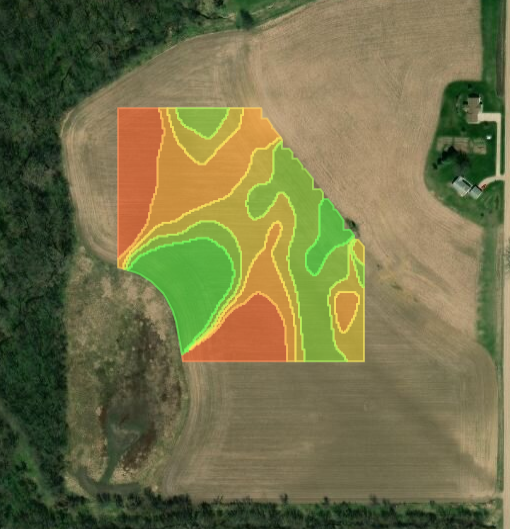
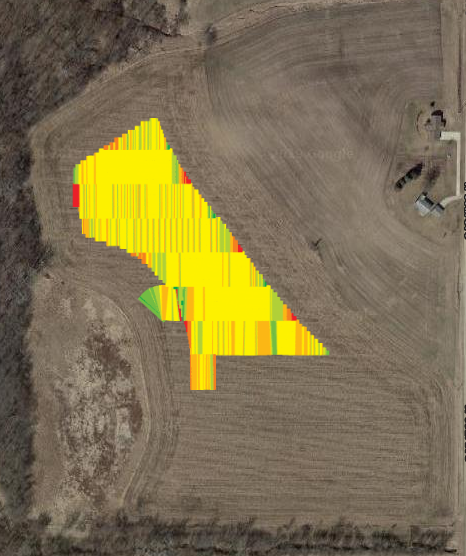
- As you can see this field isn't showing the documentation data for the entire field.
- Is the field incomplete in both Field Analyzer and Field Analyzer Beta?
- Yes:
- Check to see if there is an active boundary that is incorrect causing the missing data to not be included. Correct active boundary and reprocess documentation data for that field operation using the Files page.
- No:
- Find documentation data for that field operation using the Files page and reprocess. After file has successfully been reprocessed check to see if Field Analyzer and Field Analyzer Beta match. If not, work with your John Deere dealer to submit a DTAC case or use the form located here to submit a case.
- Yes:
Agrian does not show an operation that I expected to see -
- Agrian and Field Analyzer Beta use the same system to send and receive data. Verify that the map layer is showing in Field Analyzer Beta.
- Use the links below to verify the field operation or map layer you are looking for is compatible.
Agrian shows incorrect unit of measure -
- Unit of measure preference is passed to Agrian from the Operations Center. To correct this, go into Organization Preferences - Settings and change the Unit of Measure to the desired unit.
- Close Agrian and re launch to show the correct Unit of Measure.
- Agrian's language selection in settings only changes the language of the text shown on the page NOT the unit of measure.
Agrian does not send a prescription file to the Operations Center -
- If a prescription is created without any products assigned to zones, Agrian does not send a prescription file to Files Manager.
- Ensure at least one product is selected and assigned to zones within the field.
I need additional information on how to use Agrian Prescription Creator -
- Use the link below to access Agrian's help documentation. Agrian is supported by John Deere. If you need additional assistance with troubleshooting a problem submit a well prepared DTAC case or use the support form link. - Support Form
- Agrian help documentation - Click Here
Additional Articles -